EVA GPU MIG/MPS Optimization Guide




EVA optimizes not only model inference, but also GPU partitioning and process execution strategies to reliably operate Vision Models and VLMs in large-scale camera environments. What matters in this process is not simply using a more powerful GPU. When Vision Models and VLMs run together, actual service performance can vary significantly depending on how GPU resources are partitioned and how multiple inference processes are executed.
EVA does not rely solely on model optimization or application-level scheduling. It determines the optimal configuration for each deployment environment by considering the number of GPUs installed in the server, GPU memory capacity, MIG partitioning availability, MPS effectiveness, and the placement of Vision Workers and vLLM instances.
In other words, EVA is not just a service that runs AI models. It maximizes system resource efficiency by considering hardware-level GPU configuration and the behavior of the Serving Framework. This allows EVA to reliably process requests from many cameras, even with limited server resources.
In this article, we compare the effects of MIG and MPS based on actual EVA experiment data from the following three perspectives.
- MIG effectiveness on a multi-GPU server: PRO 5000 x3
- MIG effectiveness on a single-GPU server: PRO 6000 x1
- MPS effectiveness in an environment with many Vision Workers
Through this analysis, we aim to provide practical criteria for determining which MIG/MPS configuration is most suitable for EVA operation, rather than applying MIG or MPS unconditionally.
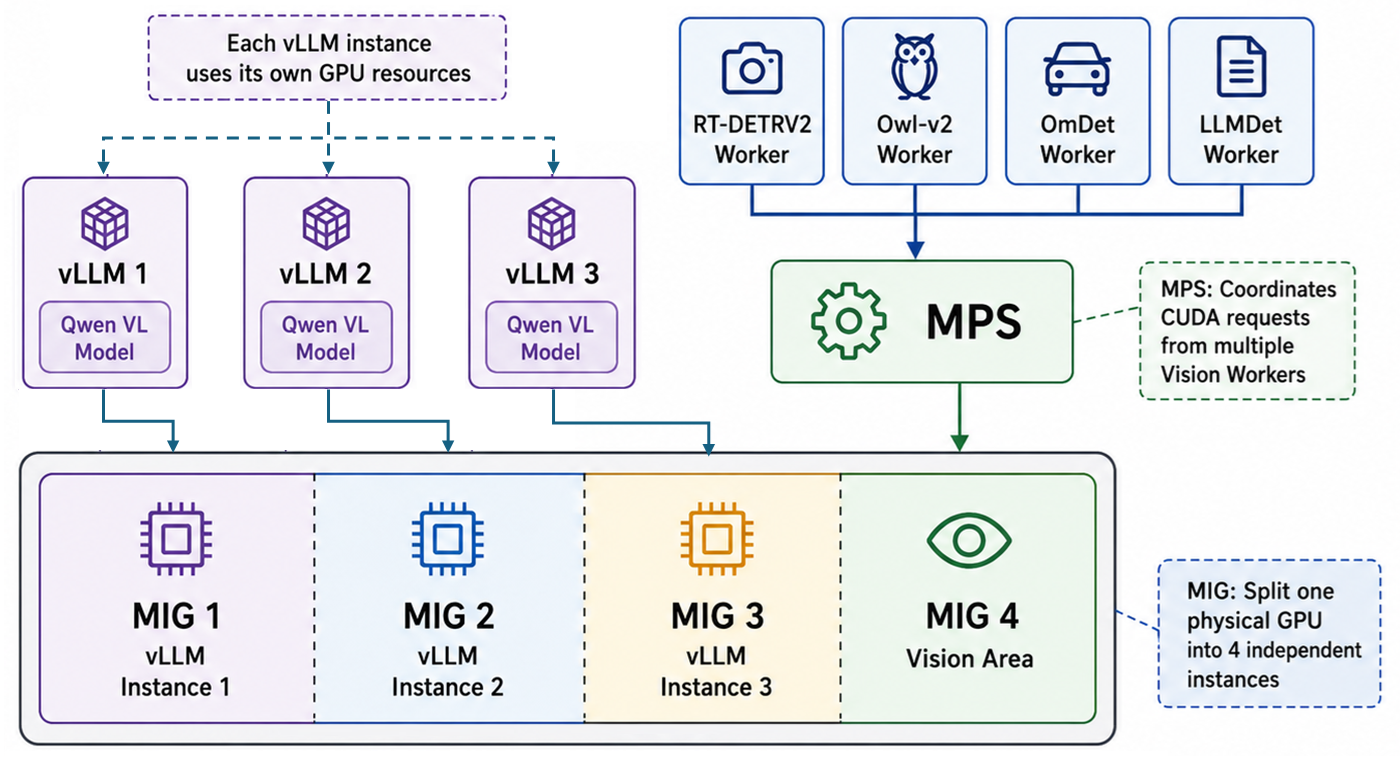
- MIG(Multi-Instance GPU): A feature that partitions a single physical GPU into multiple independent GPU instances. It can reduce resource contention by placing Vision and vLLM workloads on separate instances.
- MPS(Multi-Process Service): A feature that allows multiple CUDA process requests to be coordinated through a single server process. It can reduce context-switching overhead in multi-process environments.
1. EVA Inference Architecture
An EVA server runs two major inference layers at the same time.
- Vision: Processes various object detection models such as RT-DETRV2, Owl-v2, OmDet, and LLMDet in parallel through multiple Worker processes.
- vLLM(VLM Serving): Receives Agent requests, decomposes user-defined scenarios into multiple tasks, and determines whether the scenario condition is met through multi-step inference.
The key point in EVA’s inference architecture is that Vision and vLLM use the GPU in different ways.
| Category | GPU Usage Pattern |
|---|---|
| Vision | Many Workers frequently generate short inference requests |
| vLLM | Processes relatively large inference workloads through continuous batching |
| Mixed execution | When Vision and vLLM share the same GPU, context-switching overhead can accumulate |
For models used by many cameras, EVA assigns more Workers to those models so that inference requests can be processed in parallel by model type. On the other hand, vLLM processes multiple requests together through continuous batching, so simply increasing the number of instances does not always lead to higher throughput.
Therefore, EVA determines whether to apply MIG and MPS based on the server configuration and workload characteristics.
2. Experiment Environment
2.1 Server Configuration
The experiment was conducted using the following two GPU server configurations.
| Server | GPU Configuration | MIG Configuration |
|---|---|---|
| Server A | RTX PRO 5000 48GB x 3 | 24GB x 6 |
| Server B | RTX PRO 6000 96GB x 1 | 24GB x 4 |
2.2 Service Placement
Because Vision and vLLM have different GPU usage patterns, it is important to determine which GPU or MIG instance each workload should be placed on.
In general, Vision is configured as the area responsible for object detection requests, while vLLM is configured as the area responsible for Agent VLM-based reasoning requests. When MIG is applied, each remaining GPU resource or MIG slice, excluding the GPU or MIG slice used by Vision, is assigned one vLLM instance.
For example, when MIG is applied on the PRO 5000 x3 server, six 24GB MIG slices are created. One slice is assigned to Vision, and one vLLM instance is placed on each of the remaining five slices. The same approach is used on the PRO 6000 x1 server: among four 24GB MIG slices, one is assigned to Vision and the remaining three are assigned to vLLM instances.
| Environment | MIG | Placement | Description |
|---|---|---|---|
| PRO 5000 x3 | X | Vision / vLLM / vLLM | Among three physical GPUs, one is used for Vision and the other two are used for vLLM instances |
| PRO 5000 x3 | O | Vision / vLLM / vLLM / vLLM / vLLM / vLLM | Among six 24GB MIG slices, one is used for Vision and the remaining five are used for vLLM instances |
| PRO 6000 x1 | X | Vision + vLLM | Vision and vLLM run together on a single 96GB GPU |
| PRO 6000 x1 | O | Vision / vLLM / vLLM / vLLM | Among four 24GB MIG slices, one is used for Vision and the remaining three are used for vLLM instances |
This configuration was designed to evaluate whether MIG can improve actual throughput when Vision and vLLM are separated as much as possible and vLLM instances are evenly placed on the remaining GPU resources.
3. Metric Definitions
In this article, Vision and Agent throughput are compared using the following metrics.
| Metric | Definition |
|---|---|
| Vision throughput | req/s |
| Agent throughput | req/min |
The conversion formulas are as follows.
- Vision
req/s= Total Vision requests processed in 1 hour / 3600 - Agent
req/min= Total VLM responses in 1 hour / 60
4. MIG Effect on PRO 5000 x3
4.1 Measurement Results
In the PRO 5000 x3 environment, we measured the performance impact of the MIG-enabled configuration under the following conditions.
- Test scenario: Single scenario
- Vision model configuration: Single Vision model
Therefore, the results below should not be directly compared with the PRO 6000 x1 environment. Instead, they should be interpreted as the performance change within the same PRO 5000 x3 environment before and after applying the MIG-enabled configuration.
| MIG | MPS | VLM responses | VLM Latency | Vision Throughput (req/s) | Agent Throughput (req/min) |
|---|---|---|---|---|---|
| X | X | 2,287 | 10.39 s | 29.36 | 38.11 |
| O | O | 2,229 | 10.84 s | 22.63 | 37.15 |
4.2 Interpretation
In the multi-GPU PRO 5000 x3 configuration, increasing the number of vLLM instances through MIG did not produce a meaningful improvement in vLLM throughput.
Because vLLM was already efficiently handling concurrent requests through continuous batching, increasing the number of instances did not directly translate into higher throughput. In addition, the reduced available resources per instance caused by MIG partitioning and the overall workload placement changes appear to have contributed to the decrease in Vision throughput.
From an operational perspective, the following factors should also be considered when applying MIG.
- MIG partitioning policy management
- Instance-level monitoring
- Reassignment and recovery procedures in case of failure
- Workload-specific instance size adjustment
Therefore, in a multi-GPU environment such as PRO 5000 x3, it is more appropriate to start without MIG by default and consider MIG only when resource contention between Vision and vLLM is clearly identified.
5. MIG Effect on PRO 6000 x1
5.1 Measurement Results
In the PRO 6000 x1 environment, we measured the performance impact of the MIG-enabled configuration under the following conditions.
- Test scenario: Two or more complex scenarios
- Vision model configuration: Multiple Vision models
Therefore, the results below should not be directly compared with the PRO 5000 x3 environment. Instead, they should be interpreted as the performance change within the same PRO 6000 x1 environment before and after applying the MIG-enabled configuration.
| MIG | MPS | VLM responses | VLM Latency | Vision Throughput (req/s) | Agent Throughput (req/min) |
|---|---|---|---|---|---|
| X | X | 712 | 47.20 s | 20.33 | 11.87 |
| O | O | 1,032 | 32.10 s | 26.33 | 17.20 |
5.2 Interpretation
In the single-GPU PRO 6000 x1 configuration, the effect of MIG was clearly observed.
Without MIG, Vision Workers and vLLM share a single physical GPU. In this case, many Vision Workers repeatedly generate short inference requests, while vLLM processes relatively large inference workloads. As a result, GPU ownership can switch frequently between workloads.
By applying MIG, the GPU resources used by Vision and vLLM are isolated into hardware-level independent instances. This reduces resource contention between workloads and allows each inference pipeline to run more stably.
| Metric | MIG Disabled | MIG Enabled | Change |
|---|---|---|---|
| VLM responses | 712 | 1,032 | +44.9% |
| VLM Latency | 47.20 s | 32.10 s | -32.0% |
| Agent Throughput | 11.87 req/min | 17.20 req/min | +44.9% |
| Vision Throughput | 20.33 req/s | 26.33 req/s | +29.5% |
These results show that MIG can be an effective option in high-density environments where Vision and vLLM must run together on a single GPU. In particular, the more different the GPU usage patterns of Vision and vLLM are, the greater the benefit of hardware-level isolation through MIG can be.
6. MPS Effect in an Environment with Many Vision Workers
Vision models run through multiple Worker processes that send requests to the GPU at the same time. When the number of Workers increases, GPU ownership can switch frequently between processes.
By applying MPS, multiple CUDA process requests can be coordinated through a single MPS server. This can reduce context-switching overhead and improve GPU utilization in multi-process environments.
In this experiment, we compared the effect of MPS on the PRO 5000 environment without applying MIG.
| MIG | MPS | Total requests | Total throughput | RT-DETRV2 | Owl-v2 | OmDet | LLMDet |
|---|---|---|---|---|---|---|---|
| X | X | 7,131 | 23.770 req/s | 4.337 req/s | 5.597 req/s | 10.953 req/s | 2.883 req/s |
| X | O | 7,794 | 25.980 req/s | 4.490 req/s | 7.447 req/s | 11.120 req/s | 2.923 req/s |
With MPS enabled, total Vision throughput increased by approximately 9.3%, from 23.770 req/s to 25.980 req/s.
Among the models, Owl-v2 showed the largest throughput improvement, while RT-DETRV2, OmDet, and LLMDet also showed slight improvements. This indicates that MPS can help coordinate multi-process requests more stably in environments with many Vision Workers.
7. Final Conclusion
This experiment confirmed that MIG and MPS are not features that should be applied uniformly in every environment. Instead, they should be applied selectively depending on the GPU configuration and workload characteristics.
7.1 Multi-GPU Server: PRO 5000 x3
In an environment such as PRO 5000 x3, where multiple physical GPUs are available, Vision and vLLM can be separated at the physical GPU level. In this case, additionally applying MIG to increase the number of vLLM instances showed limited throughput improvement.
- vLLM already handles concurrent requests efficiently through continuous batching
- Increasing the number of instances does not directly lead to higher throughput
- MIG partitioning can increase operational complexity and resource fragmentation
- The default recommendation is to start without MIG
7.2 Single-GPU Server: PRO 6000 x1
In an environment such as PRO 6000 x1, where Vision and vLLM must run together on a single physical GPU, MIG showed a significant effect.
- Vision and vLLM have different GPU usage patterns
- Sharing a single GPU can increase context-switching overhead
- MIG reduces resource contention between workloads
- MIG should be considered first for high-density single-GPU configurations
7.3 Environment with Many Vision Workers
MPS can be effective in environments with many Vision Workers.
- Many Workers generate GPU requests concurrently
- GPU ownership switching between processes can increase overhead
- MPS increased total Vision throughput by approximately 9.3%
- MPS should be considered as a default option for Vision-heavy servers
8. Operational Recommendations
| Operating Environment | Recommended Configuration |
|---|---|
| Multi-GPU server focused on vLLM | Start without MIG and introduce MIG only when a clear bottleneck is identified |
| Single-GPU server with mixed Vision/VLM workloads | Consider MIG first |
| Server with many Vision Workers | Consider applying MPS |
| Server where Vision and vLLM can be separated by physical GPU | Prioritize physical GPU-level separation |
| Server with insufficient GPU memory | Prioritize model placement and Worker count adjustment before MIG |
In summary, EVA does not treat MIG and MPS as simple on/off features. It selects the optimal configuration for each environment by considering server architecture, Vision/VLM placement, Worker count, vLLM execution behavior, and operational complexity.
9. References
The following materials were referenced when organizing the analysis framework for this article.
- NVIDIA Technical Blog: Getting the Most Out of the NVIDIA A100 GPU with Multi-Instance GPU https://developer.nvidia.com/blog/getting-the-most-out-of-the-a100-gpu-with-multi-instance-gpu/
- NVIDIA Technical Blog: Boost GPU Memory Performance with No Code Changes Using NVIDIA CUDA MPS https://developer.nvidia.com/blog/boost-gpu-memory-performance-with-no-code-changes-using-nvidia-cuda-mps/
- NVIDIA Documentation: Multi-Process Service (MPS) https://docs.nvidia.com/deploy/mps/latest/index.html
- vLLM Official Blog https://vllm.ai/blog
- Anyscale Technical Blog: vLLM Throughput Analysis Based on Continuous Batching https://www.anyscale.com/blog/continuous-batching-llm-inference