EVA Release v2.3

EVA v2.3: Three Innovations to Make On-Site Operations Smarter and More Precise
The EVA v2.3 release is not just about adding new features—it’s an update designed to eliminate inefficiencies in large-scale camera operations, improve detection accuracy, and dramatically enhance the user experience. EVA is now smarter, more intuitive, and more powerful than ever.
Say Goodbye to Repetitive Tasks! Common & Custom Detection Scenarios
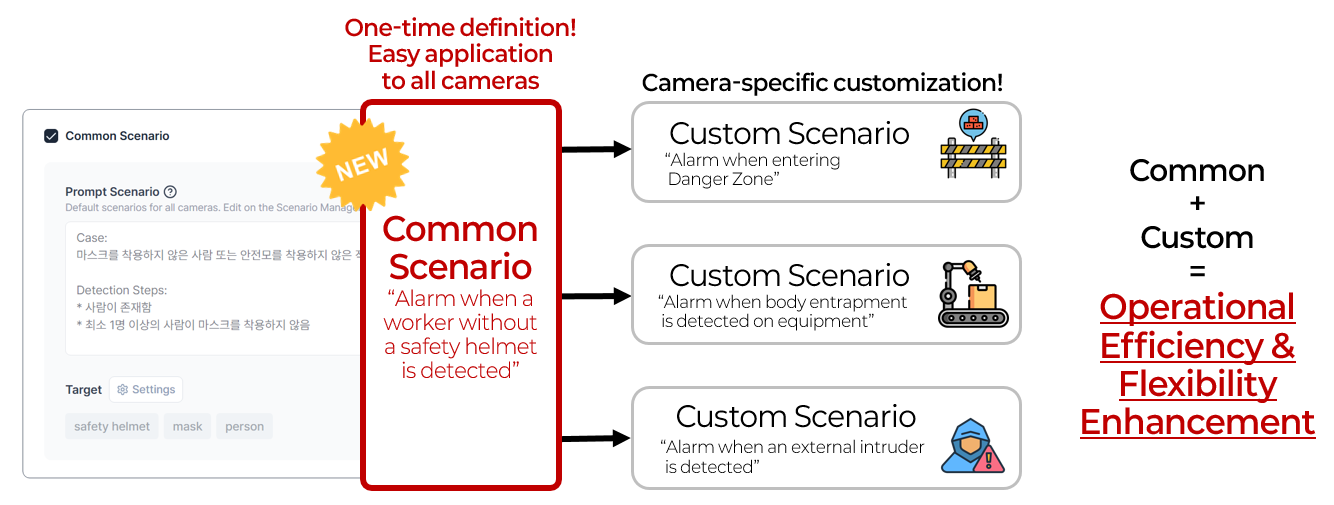
One of the biggest challenges in managing large-scale camera operations is the inefficiency of registering the same detection scenario across dozens or even hundreds of cameras. For example, if you manage 100 cameras, you previously had to register the same scenario 100 times—a time-consuming and labor-intensive process.
EVA v2.3 solves this problem by introducing the Common Scenario feature. Now, administrators only need to define a Common Scenario once in the EVA settings menu. Connected cameras can automatically apply this scenario, and if needed, you can add Custom Scenarios for individual cameras. Furthermore, EVA allows both Common and Custom Scenarios to be applied simultaneously, greatly improving operational flexibility.
What benefits does this bring to EVA users?
- Significantly reduces registration time and repetitive tasks in large-scale operations.
- Updates to Common Scenarios are automatically reflected across all cameras, maximizing management efficiency.
- Administrators can focus on strategic operations and safety enhancements instead of repetitive work.
Define Your Own Zones for More Precise Detection
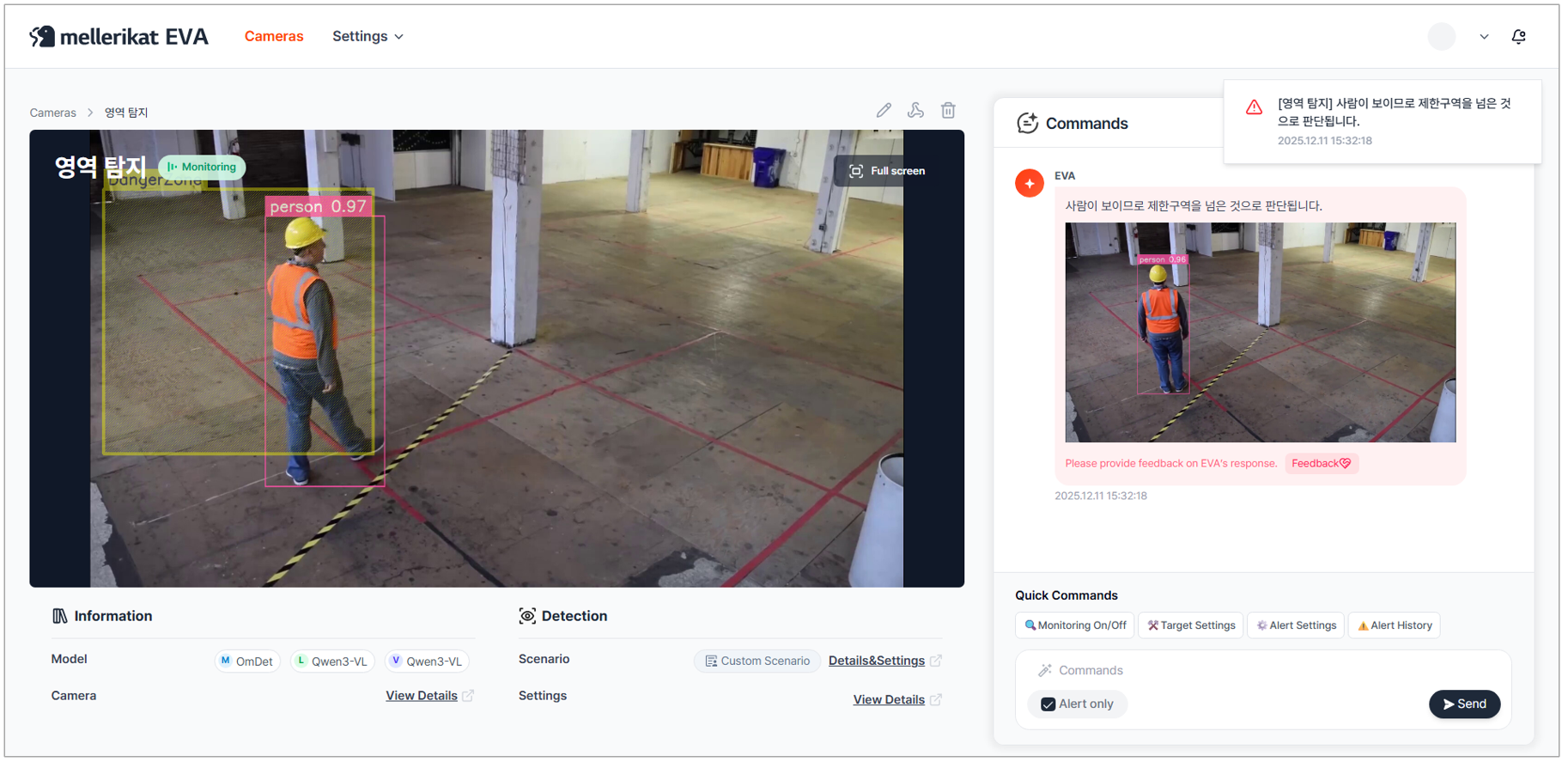
EVA v2.3 introduces a new Detection Zone Setting feature. This feature moves beyond the traditional approach of detecting across the entire screen, allowing users to freely define specific zones and apply customized scenarios to those zones. Users can draw rectangular areas on the camera stream, name them, and set detection scenarios for each. For example, you can easily implement a scenario like “Send an alert when someone enters Zone A.” But this feature isn’t limited to safety management. It can be used in various industrial environments—detecting defective products on a specific section of a production line, monitoring work status in a warehouse zone, or analyzing customer behavior around a particular display in retail stores. Now, administrators can go beyond monitoring the entire screen and focus on critical areas based on operational goals for precise detection. EVA supports scenarios that enhance safety, productivity, quality control, and customer behavior analysis.
What benefits does this bring to EVA users?
- Enables customized detection tailored to operational goals by defining specific zones.
- Reduces unnecessary alerts and ensures accurate event responses.
- Expands coverage and application range through diverse scenarios.
More Intuitive and Powerful Image Guided Detection
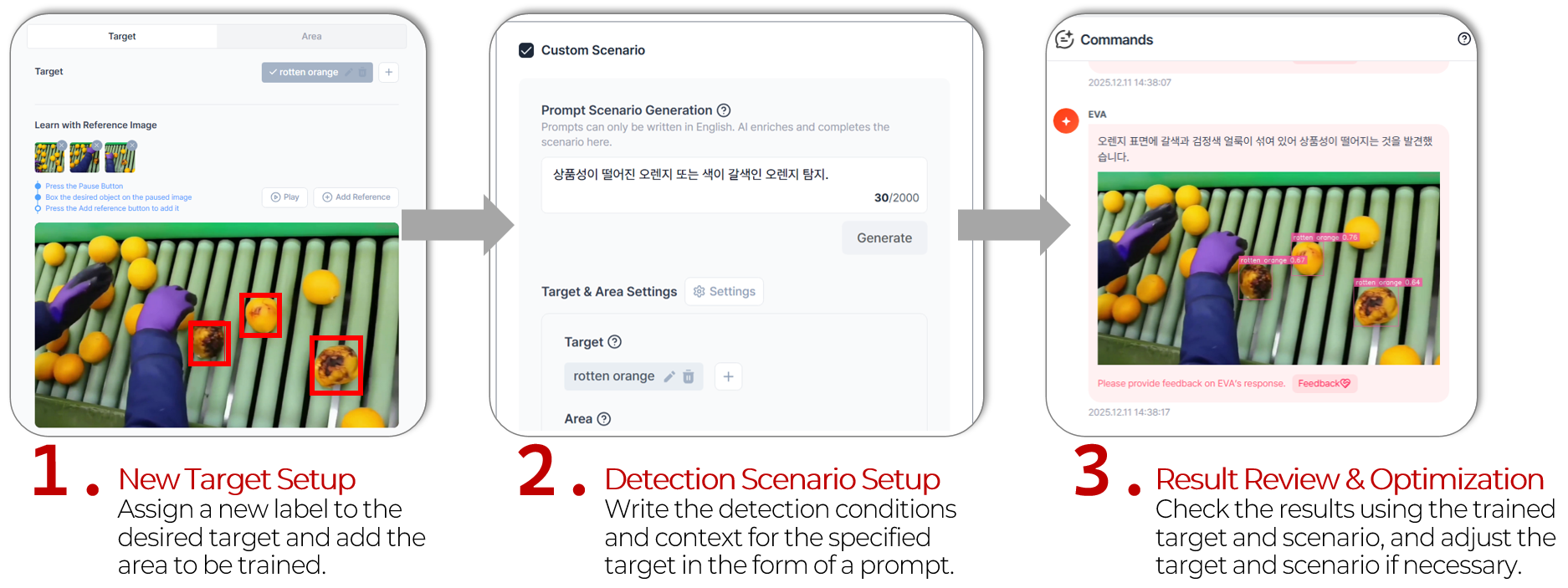
We’ve taken the Image Guided Detection feature to the next level. This feature allows users to specify images for detection. Previously, the process of selecting images, setting areas, deleting, and managing them was complex and difficult to use. In this update, we’ve made image selection, labeling, registration, editing, and deletion far more intuitive. Now, users can easily register desired images and implement customized detection with minimal effort. This feature is extremely useful for detecting defective products in manufacturing processes, but its applications go much further. For example, checking specific packaging conditions in a warehouse, monitoring product display arrangements in retail stores, or tracking the location of specific equipment on construction sites. In situations where data is scarce or existing models cannot cover certain cases, Image Guided Detection becomes a powerful alternative.
What benefits does this bring to EVA users?
- Solves data scarcity issues, enabling customized detection.
- Simplifies management processes, greatly improving user experience.
- Enhances accuracy and reliability across diverse industrial environments.
EVA continues to evolve. We will keep delivering smarter and more powerful features to support your operations.