EVA mentor: Don’t Just Watch AI in the Field—Teach It

EVA detects dangerous situations such as fire and smoke, worker falls, and missing personal protective equipment from CCTV footage and generates alerts. However, even the same scenario can produce very different detection results and false-positive patterns depending on the site and camera environment.
As the number of cameras and sites grows, the volume of alerts grows with it. When false positives accumulate, field operators stop trusting the alerts. Checking only whether cameras are connected or whether the system is running is not enough to improve detection quality; operators also need to know which cameras and scenarios need attention and whether a configuration change actually worked.
EVAmentor is an operational solution that measures performance from EVA decisions and user feedback, diagnoses problems, finds directions for improvement, and validates the results. It goes beyond monitoring system status by providing mentoring that helps operators understand the causes of false positives and decide which feedback and settings to apply. EVAmentor’s role is to help continuously refine detection quality.
1. EVAmentor at a Glance
EVAmentor connects the operational cycle of finding problems → diagnosing causes → improving → validating in one flow. Operators can review alerts, feedback, and configuration-change history using the same criteria and decide what to check and improve first.
Overview — The First Screen for Understanding Detection Status
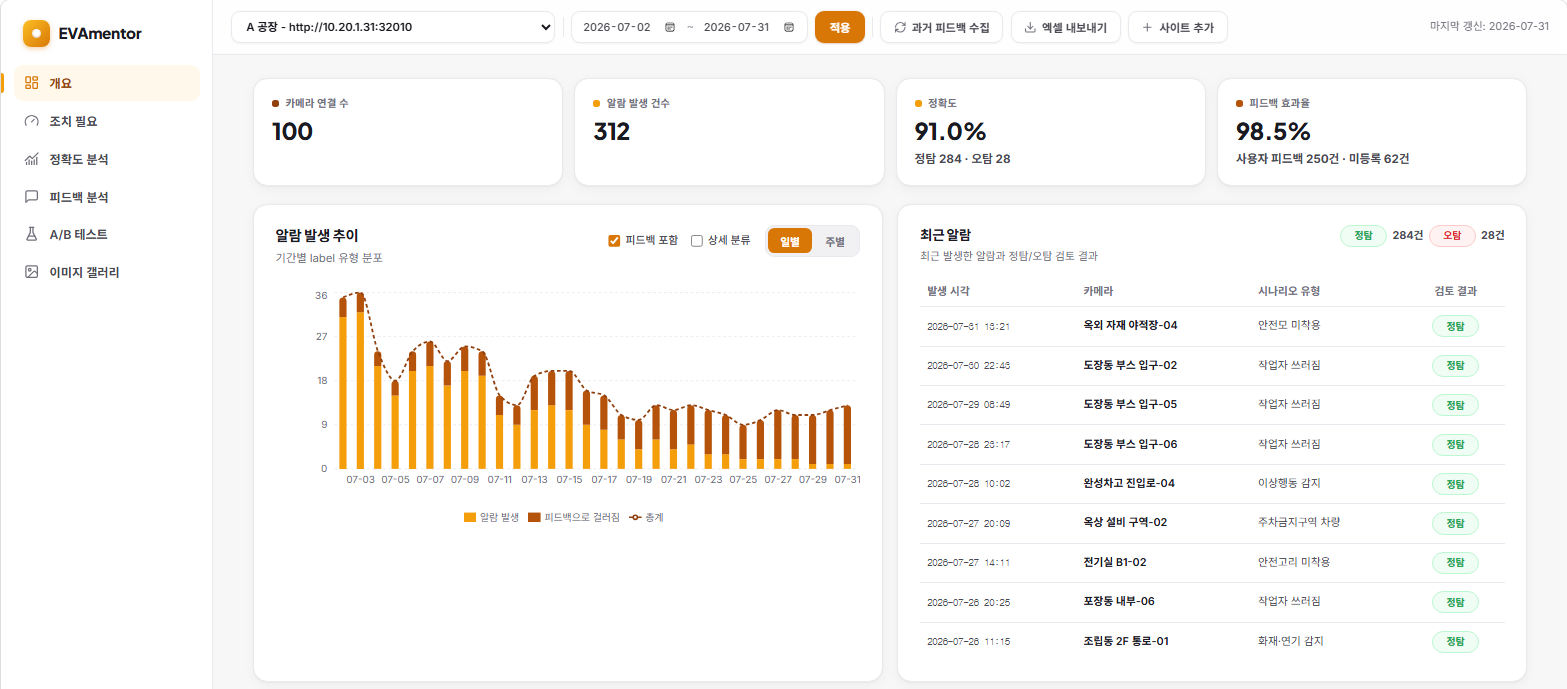
For each site, operators can see the number of cameras, alert load, alert accuracy, feedback effectiveness, and recent alerts at a glance. The screen shows not only the number of alerts, but also the share judged to be real risks and how much user feedback contributes to reducing false positives. This makes it easier to understand the current detection quality and identify what needs attention first.
Action Required — Deciding What to Review First
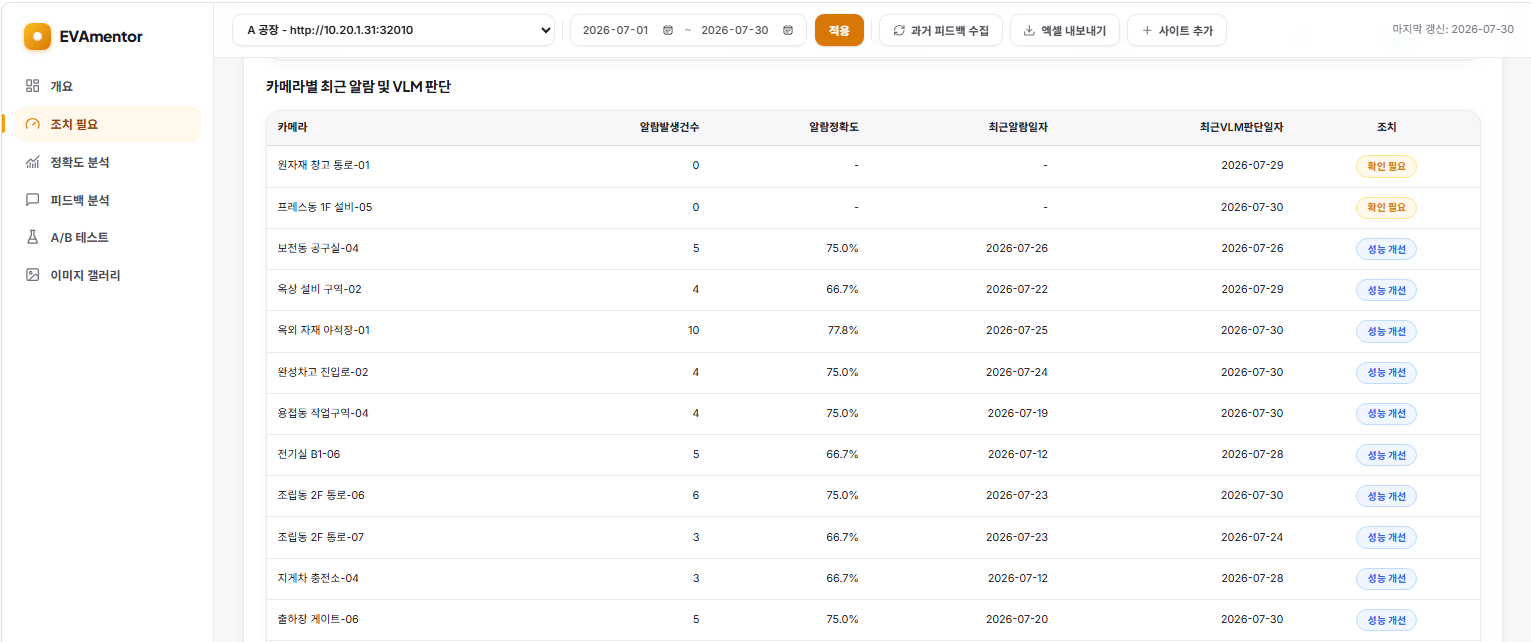
Instead of manually checking dozens or hundreds of cameras and scenarios, EVAmentor automatically classifies their status based on recent data and review history. Operators can start with items that require immediate action, such as disconnected data or concentrated false positives, instead of scanning the entire list from the beginning.
| Status | Meaning |
|---|---|
| Review for removal | No recent alerts or VLM judgments |
| Needs confirmation | Data flow or configuration needs to be checked |
| Suspected misapplication | Accuracy is very low because the scenario does not fit the site |
| Performance improvement | There is room for improvement through tuning |
| Feedback needed | Many alerts, but insufficient review |
| Maintain | Operating normally |
Accuracy Analysis ① — Understanding Performance Trends and Causes
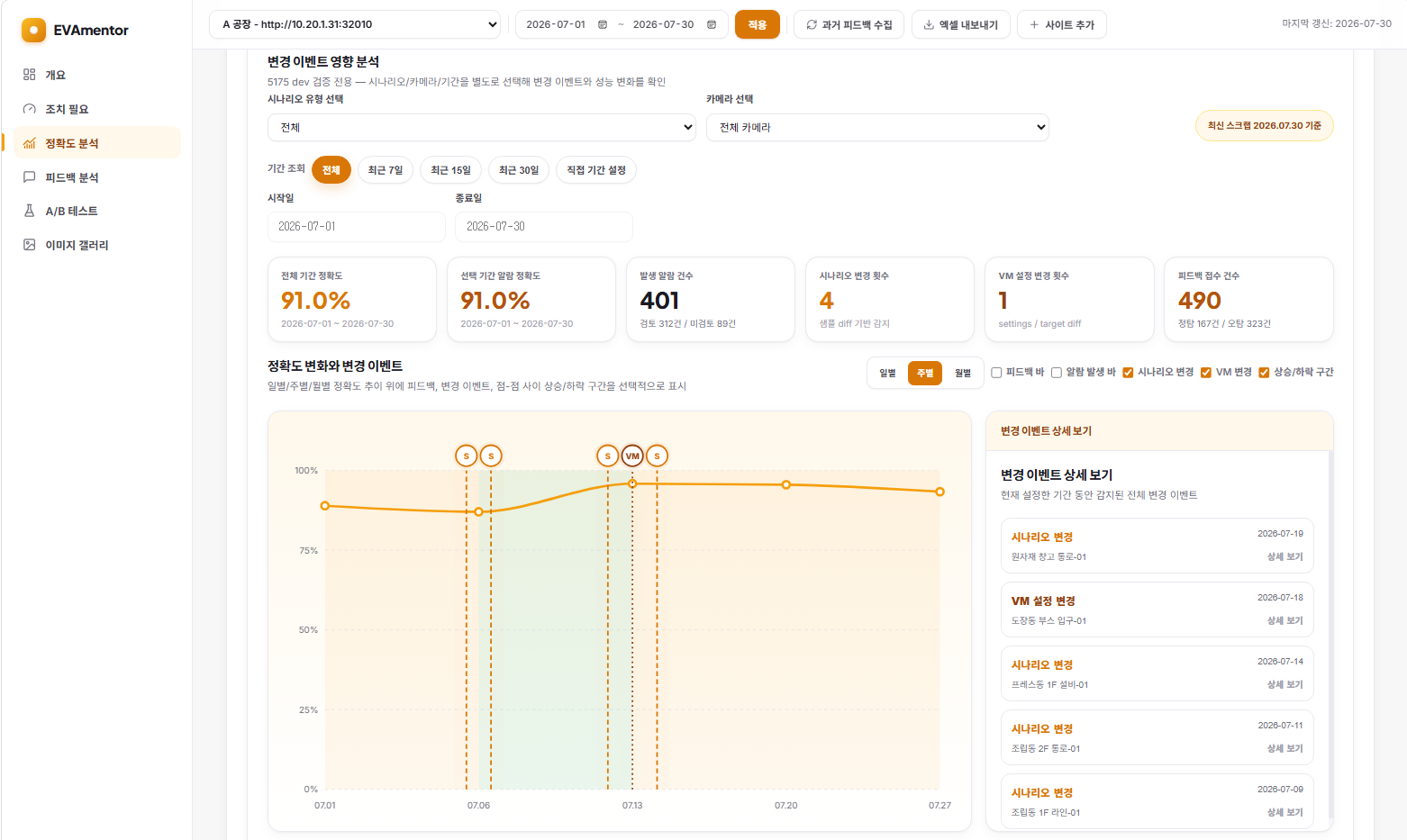
Accuracy Analysis shows alert accuracy and feedback effectiveness together with their calculation logic, and lets operators drill down into detailed metrics by scenario and camera. Because the source alerts and review results behind each metric can be examined, the data provides a basis for decisions such as keeping or removing a scenario.
Change Impact Analysis places scenario edits and model-replacement events on top of the accuracy trend. Operators can therefore understand the relationship between performance changes and configuration changes through recorded history rather than memory or guesswork.
From this screen, operators can confirm:
- when accuracy changed,
- what was changed at that point, and
- whether the change actually had an effect.
Accuracy Analysis ② — Comparing Detection Settings with Data
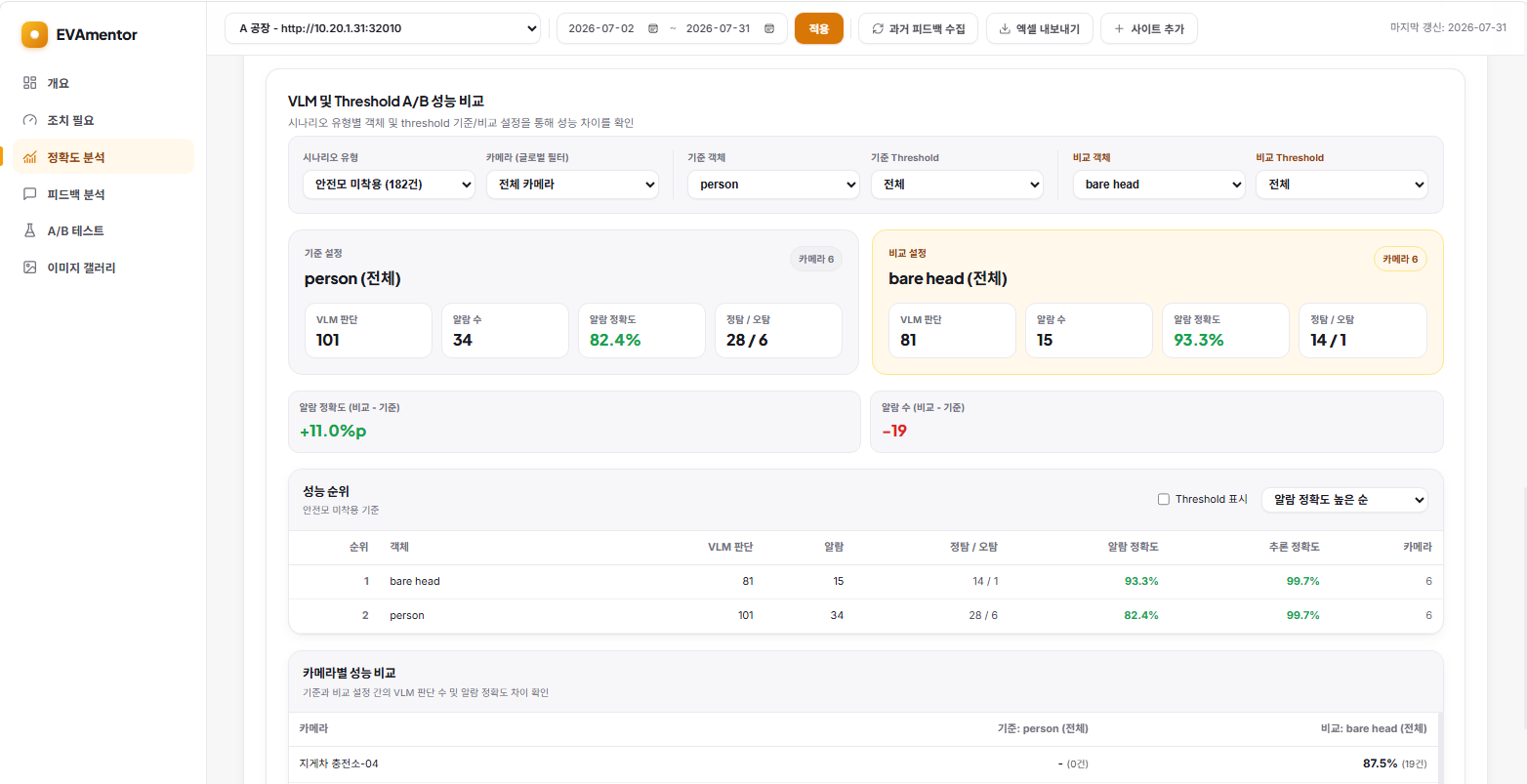
The objects and thresholds used before VLM judgment also affect the volume and quality of alerts. For example, detecting missing helmets through a person object or a bare head object can produce different results for the same scenario. By comparing the accuracy and alert counts of baseline and alternative settings side by side, operators can use data to decide which camera settings to change first.
Feedback Analysis — Checking the Feedback Loop
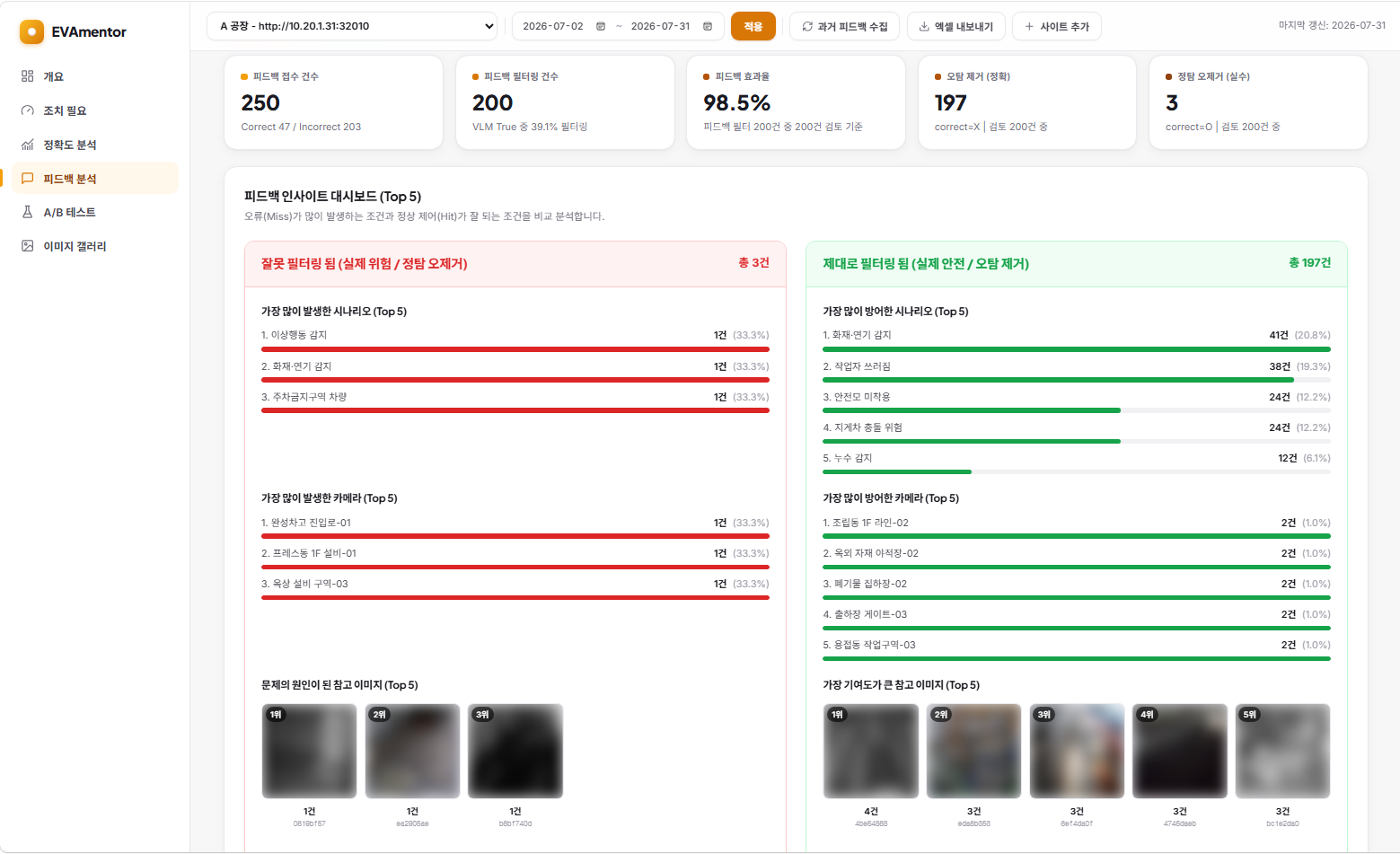
EVA suppresses similar false-positive alerts based on user feedback. EVAmentor helps verify whether this filter is working correctly:
- Did it correctly filter actual false positives?
- Did it incorrectly filter real risks?
- Which reference images contributed most to the decision?
Each event retains its reference image and similarity score, making the reason for filtering traceable. Operators can quickly find incorrectly filtered risks, refine feedback, and check whether a particular reference image is causing excessive filtering.
A/B Testing — Improving Without Waiting for False Positives to Recur
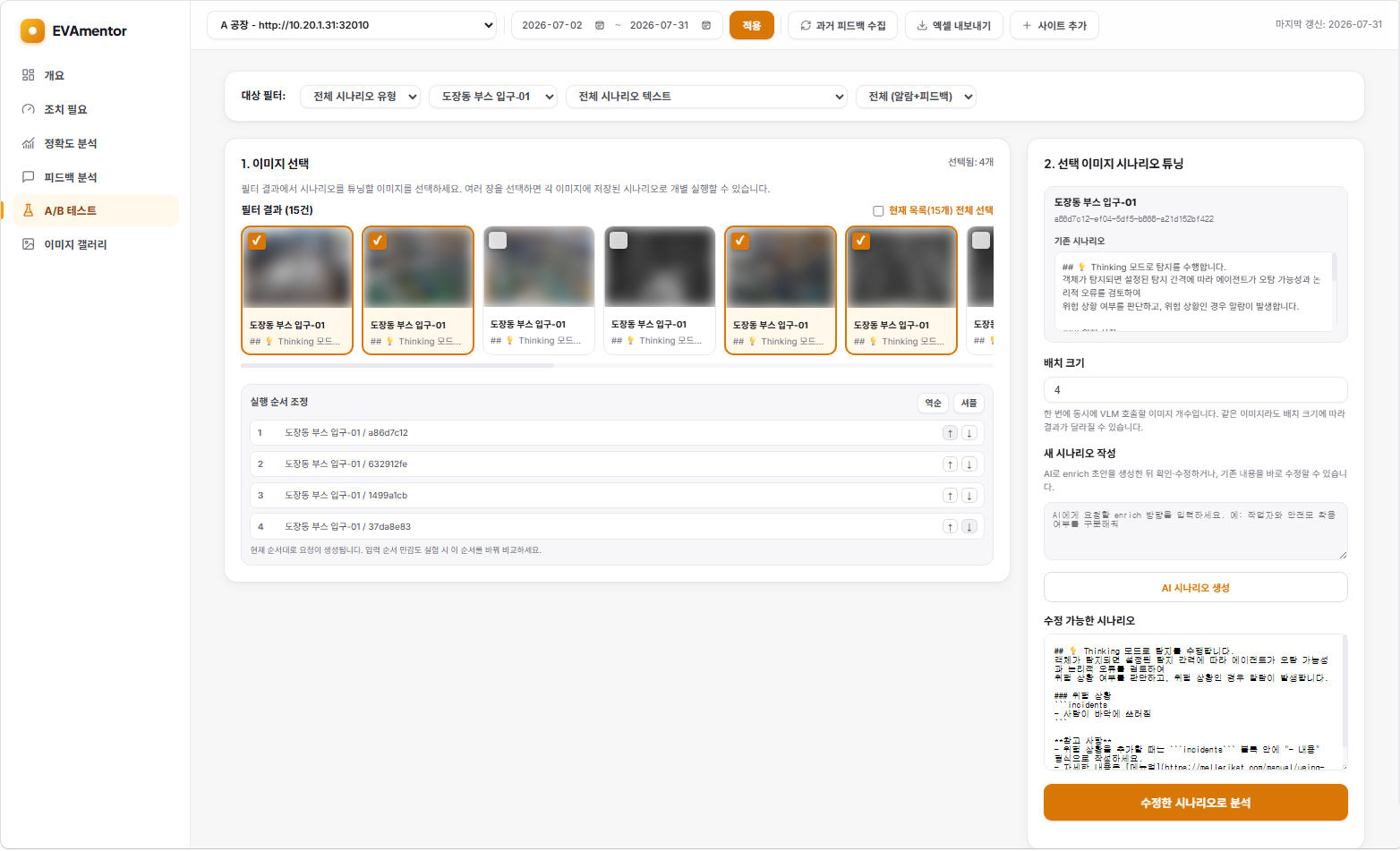
After changing a scenario, operators do not have to wait for the same situation to occur again in the field. They can use previously collected false-positive images to validate a proposed change immediately, even when the false positive occurs only rarely.
- Re-evaluate past false-positive images with the existing scenario.
- Improve the scenario using an AI-generated draft or direct editing.
- Apply the revised scenario to the same images and compare the results.
Operators can confirm before deployment whether the change reduces false positives while preserving true positives. This moves the process from discovering side effects after deployment to checking them before the change reaches the field.
Image Gallery — Turning Review into Real Improvement
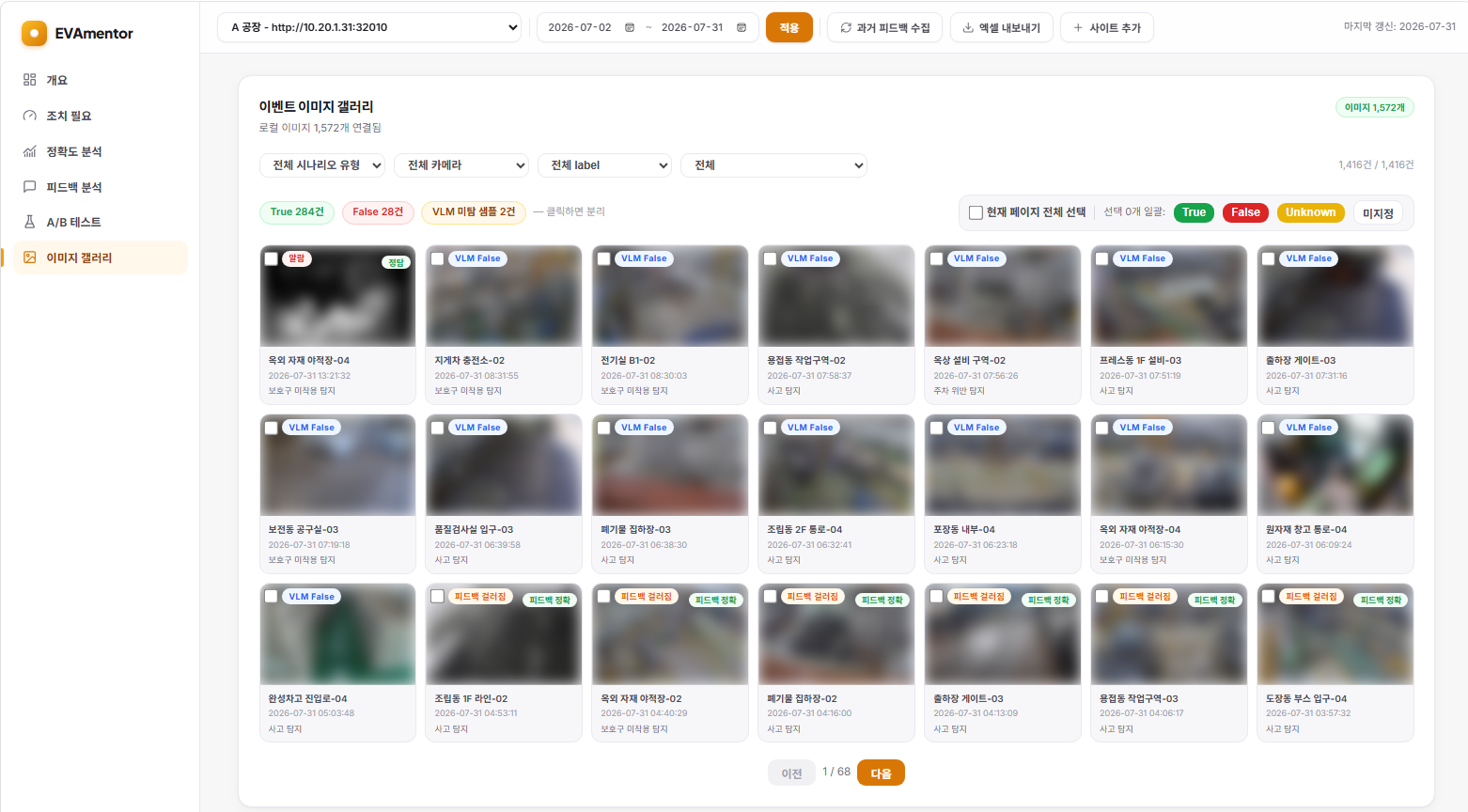
The Image Gallery brings alerts and filtered events together for true-positive and false-positive labeling. Unreviewed items can be compared visually and processed individually or in batches using conditions. Labels do not remain only in EVAmentor; they are also reflected in the corresponding EVA App analysis results and become evidence for future detections.
2. The Value EVAmentor Creates
Managing the Performance of Hundreds of Cameras
Instead of opening every alert one by one, EVAmentor automatically aggregates performance by site, camera, and scenario and presents an action priority. Even as the number of cameras grows, operators can use the same criteria to review the most important problems first. This changes the daily operation from opening alerts at random to working through the highest-priority items in the action list.
Making Invisible Problems Visible
EVAmentor surfaces incorrect feedback filters, review gaps, disconnected cameras, and scenarios that no longer fit the site through clear statuses and metrics. It also exposes problems that are easy to miss, such as a blind spot where alerts keep arriving but nobody reviews them, or a filter that suppresses real risks along with false positives. Because the basis for each metric is shown, operational decisions can be explained and defended.
Reducing Review Burden and Building Operational Assets
Operators can label images immediately and process selected items in batches. Since the system shows what should be reviewed first, more important events can be handled within the same amount of time. The resulting review history becomes an operational asset for comparing performance before and after a scenario change and tracking long-term trends.
Making Improvement About Validation, Not Guesswork
Past false-positive images, object and threshold comparisons, AI-generated scenario drafts, and change-impact analysis allow teams to measure the effect from before a change is made through after it is applied. The process shifts from changing settings based on experience and waiting for field alerts to making data-driven changes and validating them immediately.
Human Decisions Make the System Smarter Again
Labels and review results from EVAmentor are reflected in the next decisions made by EVA App. As their effect is measured again, a positive cycle of measurement → diagnosis → improvement → application → remeasurement is created. With each iteration, decisions that do not fit the site decrease and the foundation for trusting field alerts grows stronger.
3. Closing
If EVA is the system that watches over the field, EVAmentor is the solution that watches over EVA and makes it more accurate.
Detection results · Feedback collection
    ↓
Performance metric aggregation
    ↓
Automatic classification of items requiring action
    ↓
Evidence image review · True/false-positive confirmation
    ↓
A/B testing · Detection-setting comparison
    ↓
Re-measurement of improvement effects
Detection quality is not created by a single tuning exercise. It is built by operating this loop continuously.