EVA Release v2.7

EVA v2.7: Lighter Setup, Tighter Operations
When introducing Vision AI to the field, the focus often falls solely on detection performance—how accurately it can find things.
However, once you move into real-world operations, a fundamental truth becomes clear: "Operational continuity is just as important as detection performance."
Detection scenarios constantly change, the number of cameras grows, and light and shadows shift from moment to moment.
No matter how sharp the vision is, if configuration is complex and the system is fragile to environmental changes, earning trust in the field is difficult.
EVA v2.7 began with a clear goal: to reduce operational friction in real-world environments to zero.
- Model selection fatigue: The operational burden of having to find and compare the optimal model whenever a scenario changes
- Lighting uncertainty: Instability caused by brightness changes due to time of day and weather, leading to degraded detection performance
- Limits of detection area setup: Simple configuration methods that fail to reflect complex real-world structures such as pillars, walls, and corridors
- Fragmented management: Scattered information across individual cameras that hinders intuitive understanding and rapid response
This update goes beyond adding features. Guided by the principle of "Simpler setup, more precise detection", EVA v2.7 lays a solid foundation to elevate operational quality in the field.
Experience the evolution of EVA v2.7, where complexity is hidden behind the technology and only clarity is delivered.
“Which model is best?”—Now EVA decides for you
Automatic Vision Model (VM) Recommendation Based on Detection Scenarios
One of the most frustrating moments in operating Vision AI is standing in front of a long list of AI models, unsure which one to choose.
Questions like “Is Model A better for fall detection, or is Model B more accurate?” or “Which model responds more sensitively to nighttime fire detection?” create psychological pressure and consume valuable time.
EVA v2.7 completely removes this technical barrier. Once the operator defines a detection scenario, EVA automatically recommends the Vision Model (VM) optimized for that scenario.
- Expert-level results without expertise: You don’t need to know the detailed characteristics of each model. Simply selecting a scenario instantly recommends the best model combination for the site.
- Consistently high detection quality: Prevents detection performance from varying based on operator experience, ensuring the system consistently delivers optimal performance in any environment.
- Dramatically reduced setup time: By eliminating the need to test and compare multiple models, the workflow for building new scenarios and deploying them on-site becomes significantly faster.
While EVA’s internal capabilities continue to grow more advanced and complex, the interface users encounter is becoming even simpler. EVA absorbs the technical complexity so users can focus solely on what matters most: safety and operations.

Drawing Real-World Detail with Lines and Surfaces
Precise Area Configuration with Polygon-Based Detection Zones
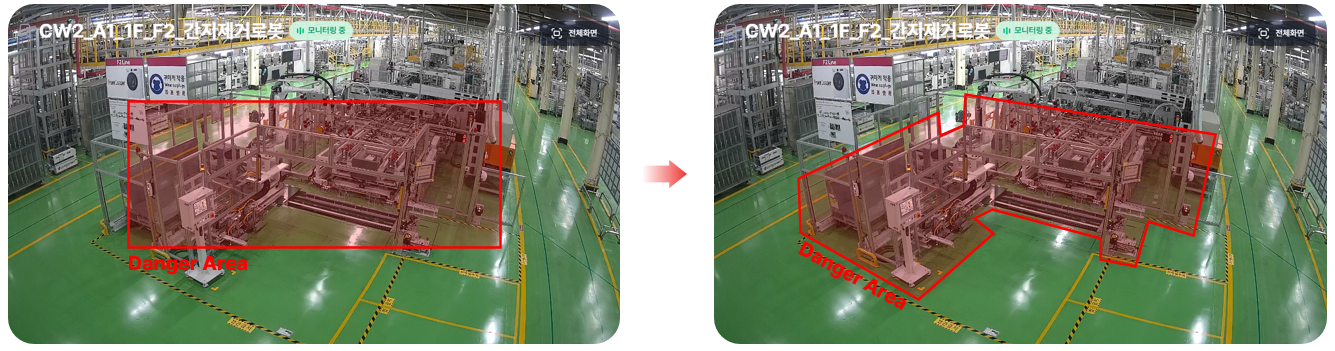
Real-world sites never behave like neat rectangular diagrams. Thick pillars block the view, corridors twist and turn, and certain areas take on irregular shapes due to machinery and equipment.
Traditional rectangle-based configuration was easy to set up, but it was always slightly insufficient for fully capturing complex real-world environments.
To overcome these physical limitations, EVA v2.7 introduces polygon-based free-form area configuration.
Now, instead of forcing spaces to fit the system, the system flexibly adapts to the actual shape of the space.
- Seamless handling of complex structures: Precisely draw only the truly relevant detection areas by freely connecting points while avoiding obstacles such as pillars, walls, and storage units.
- Fundamental reduction of false positives: By perfectly filtering unnecessary movements near boundaries or interference from adjacent zones at the software level, alert reliability is significantly improved.
EVA is evolving not by simplifying and distorting real-world spaces, but by acknowledging and faithfully reflecting their three-dimensional complexity. This goes beyond convenience—it becomes a key indicator of how accurately Vision AI understands the real world.
A Steady Gaze Under Any Light
Screen Brightness Adjustment for Lighting Optimization
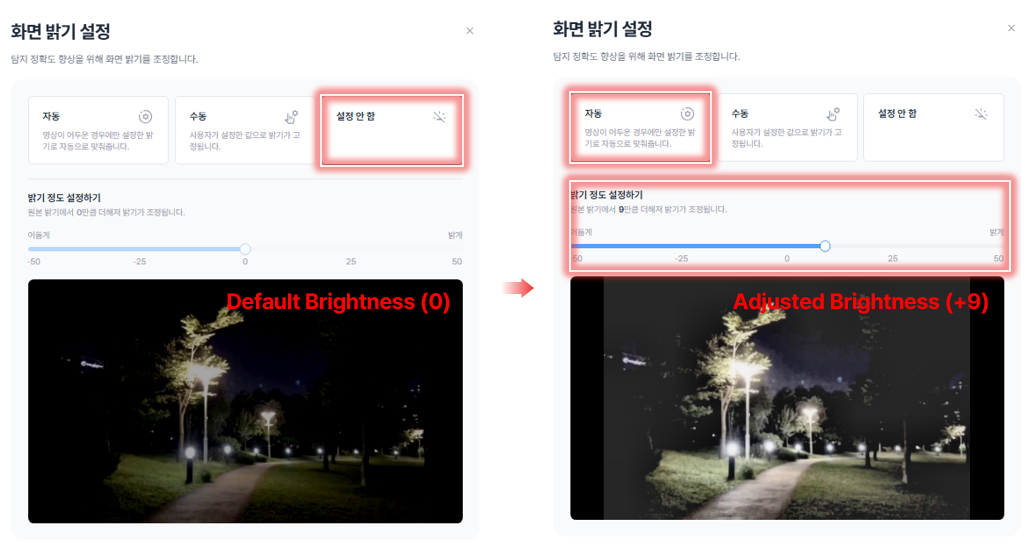
Environmental conditions in the field are never static—harsh midday sunlight, suddenly dark scenes during heavy rain, or insufficient lighting at night. For Vision AI, these lighting changes are among the most challenging factors affecting detection accuracy.
EVA v2.7 introduces a new brightness optimization feature that allows operators to immediately control these uncertainties.
Without modifying the video source itself or making complex camera setting changes, all lighting optimization is handled directly within EVA’s screen brightness settings.
- Intuitive slider control: Adjust brightness precisely using a slider ranging from -50 to +50. Reduce brightness when objects appear washed out, or increase it when shapes are unclear due to darkness.
- Instant real-time application: Changes are applied immediately without rebooting or reconnecting streams. Operators can find the optimal “golden brightness” in real time.
- Maximum environmental adaptability: Even cameras in poorly lit blind spots or areas with drastic lighting changes throughout the day can now maintain stable, 24/7 detection quality through software-based correction alone.
Light may change, but EVA’s detection performance should not. With this update, experience a robust vision that remains steady under even the harshest lighting conditions.
From Detection to Action
On-Site Automation Through Expanded Workflow Builder Webhook Channels
The true completion of field operations is not answering “What was detected?” but “So what action should be taken?”
If Vision AI once stopped at identifying and notifying critical situations, it must now extend into automating the response that follows.
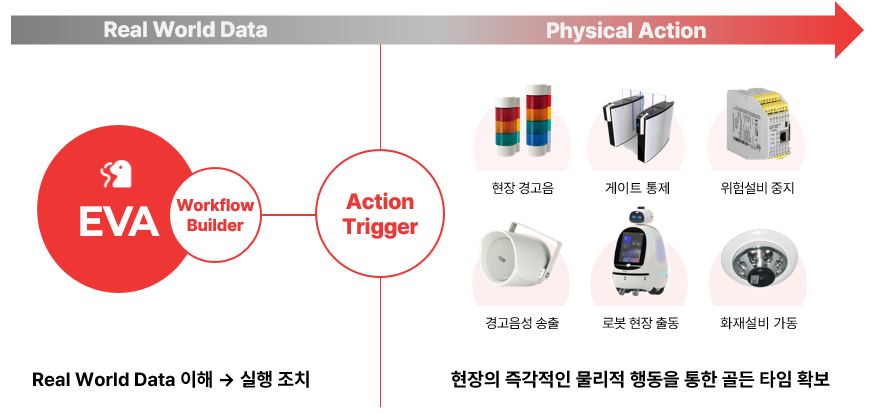
EVA v2.7 significantly expands Webhook channels for integration with Workflow Builder.
By removing the complex development effort previously required for external system integration, EVA now provides a fast lane where captured Real World Data leads directly to immediate action.
- Integration with intelligent Workflow Builder: Detection data sent by EVA is interpreted and branched in real time within Workflow Builder. For example: “If PPE non-compliance is detected → First, send a messenger alert; second, broadcast a warning.”
- Physical action triggers: Move beyond digital notifications to immediately trigger real-world actions such as alarms, access gate control, or emergency equipment shutdown—securing the critical golden time before human intervention.
- Unlimited scalability: Combine EVA with thousands of apps supported by Workflow Builder—including email, ERP systems, and IoT devices—to design custom response scenarios tailored to your site.
EVA now stands at the center of an integrated response process that flows from [Detection → Workflow Optimization → Immediate Action]. Experience the true value of Physical AI, where data transforms into tangible safety and operational efficiency.
An Optimized Layout That Expands the Operator’s View
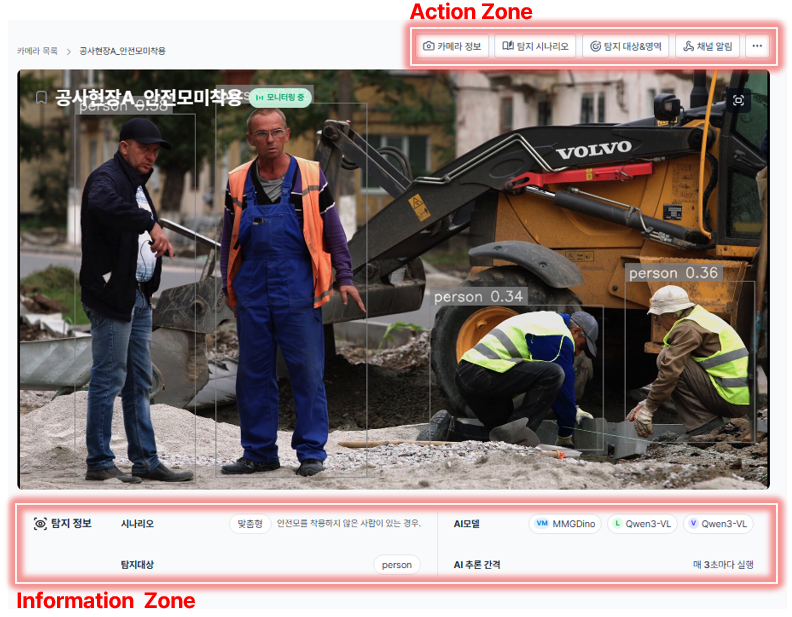
Complete Overhaul of Camera Detail Screen UI/UX
As the number of cameras to manage increases, even a single unnecessary click or eye movement significantly adds to operator fatigue.
EVA v2.7 reorganizes previously scattered configuration elements according to the operator’s workflow. Now, with "easy configuration and clear information", management becomes intuitive.
- Top-fixed core settings (Action Zone): Frequently adjusted items—camera name, detection scenario, detection targets and areas, alert channels—are now placed prominently at the top of the streaming screen for instant access.
- Unified information layer at the bottom (Information Zone): System operation status, such as the active model and inference cycle, is consistently organized in the lower section, dramatically improving situational awareness across multiple cameras.
- Clean feature organization (More Menu): Less frequently used functions like brightness adjustment or camera deletion are neatly consolidated into the top “more” (···) menu, minimizing visual clutter during everyday operations.
This UI overhaul is more than a visual refresh—it is an update that enhances EVA as a tool designed to accelerate operator response speed.
Closing: “Easy-to-Operate AI” Is the Most Powerful AI
The true value of Vision AI is not proven by high accuracy in a laboratory, but by its ability to operate reliably every day amid the complexity of real-world sites.
EVA v2.7 builds upon strong detection fundamentals with a solid layer of operational sustainability.
Setup is lighter, operations are more stable, and external integration is more flexible. EVA will continue to evolve as a platform that prioritizes the real challenges faced by operators behind the technology.
🚀Coming Soon: A Preview of v3.0
- Detection scenario preset features
- Improved multi-scenario input and management structure
- Support for large-scale camera registration