EVA Release v2.3.0

EVA v2.3.0: Three Innovations to Make On-Site Operations Smarter and More Precise
The EVA v2.3.0 release is not just about adding new features—it’s an update designed to eliminate inefficiencies in large-scale camera operations, improve detection accuracy, and dramatically enhance the user experience. EVA is now smarter, more intuitive, and more powerful than ever.
Say Goodbye to Repetitive Tasks! Common & Custom Detection Scenarios
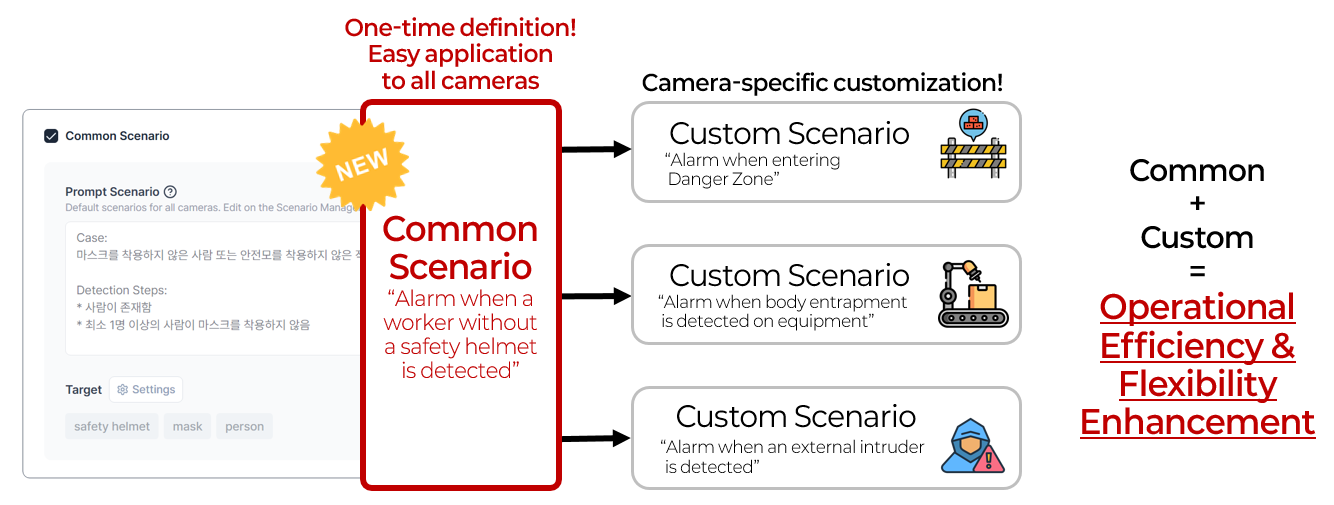
One of the biggest challenges in managing large-scale camera operations is the inefficiency of registering the same detection scenario across dozens or even hundreds of cameras. For example, if you manage 100 cameras, you previously had to register the same scenario 100 times—a time-consuming and labor-intensive process.
EVA v2.3.0 solves this problem by introducing the Common Scenario feature. Now, administrators only need to define a Common Scenario once in the EVA settings menu. Connected cameras can automatically apply this scenario, and if needed, you can add Custom Scenarios for individual cameras. Furthermore, EVA allows both Common and Custom Scenarios to be applied simultaneously, greatly improving operational flexibility.
What benefits does this bring to EVA users?
- Significantly reduces registration time and repetitive tasks in large-scale operations.
- Updates to Common Scenarios are automatically reflected across all cameras, maximizing management efficiency.
- Administrators can focus on strategic operations and safety enhancements instead of repetitive work.