More Accurate PPE Violation Detection with PPE Mode



New in EVA v3.0: More Accurate PPE Violation Detection with PPE Mode
In EVA v3.0, we introduced PPE Mode, a redesigned VLM inference pipeline to reduce false positives in PPE non-compliance detection. The key change is moving away from "directly answering user queries" toward an agent flow where the model first describes what it observes and then makes decisions based on that evidence.
1. Why did the previous approach produce many false positives?
In PPE non-compliance detection, when user queries are highly directive (for example, "find people not wearing helmets"), some VLMs tend to generate affirmative, query-aligned responses. In these cases, even weak visual evidence can still lead to a "non-compliance" answer, increasing false positives.
This is closely related to known issues in VLM/LLM systems, including hallucination and sycophancy (overly aligning with user intent).123
By contrast, prompts focused on description (for example, "describe what you see in the image") reduce pressure to agree with user intent and tend to produce more faithful object-state descriptions.
2. EVA v3.0 Agent Upgrade: From "Answering the Query" to "Describe, Then Decide"
PPE Mode in EVA v3.0 separates detection into a 3-stage pipeline so that VLM decisions are less directly biased by user intent.
If the previous approach was close to "user query -> immediate decision," PPE Mode separates evidence formation into "target selection -> body-part verification -> state description -> rule matching" to reduce false alarms.
Core Principles
- Check work context first: Select candidate workers using person-level boxes, while also incorporating full-image context for scenarios like elevated work.
- Separate wearing state from verifiability: Distinguish "what is worn" from "whether the required body part is actually visible."
- Keep final decisions rule-consistent: Standardize alert criteria by matching required items, synonyms, and required-body-part visibility together.
3-Stage Flow
Stage 1. Candidate Worker Selection and Required Body-Part Definition
-
Enrich Required Equipments
- Extract synonyms for required detection items.
-
Find Worker
- For each person box detected by the object detector, determine whether that person matches the target work situation.
- Since some scenarios (for example, elevated work) require full-scene context, the decision also uses the full image.
- If multiple candidates exist, they are processed in parallel.
- ℹ️ If there are 5 or more people, only the top 5 largest bounding boxes are evaluated.
- If at least one relevant worker is found, proceed to Stage 2.
-
Required Body Parts
- Derive body parts needed to verify each required item.
- Example: mask -> frontal/side face, helmet -> head
Stage 2. Worn-Item Extraction and Body-Part Check
-
Explain Worker
- Extract worn items (helmet, mask, etc.) for workers detected in Stage 1.
- If multiple workers are detected, run in parallel.
-
Check Body Parts
- Verify whether required body parts are actually visible for workers detected in Stage 1.
- If multiple workers are detected, run in parallel.
Stage 3. Rule Matching, Alerting, and Description Generation
-
Matching Equipments
- Trigger an alert when a detected item does not match the required-item synonym set and the required body part is visible.
- Include missing required items in the alert message.
- Example: PPE non-compliance detection (helmet, mask)
-
Image Description
- Generate an image description together with the alert.
With this structure, PPE Mode avoids "immediate VLM assertions" and instead makes final decisions through "target selection + body-part check + item extraction + rule matching," improving reproducibility and operational trust.
3. Performance Review
PPE Mode is not just evaluated by final right/wrong labels. It operates by generating intermediate evidence and matching it against scenario rules. As shown below, it first infers worn items and verifiable body parts, then determines whether to trigger alerts by matching with user scenarios.
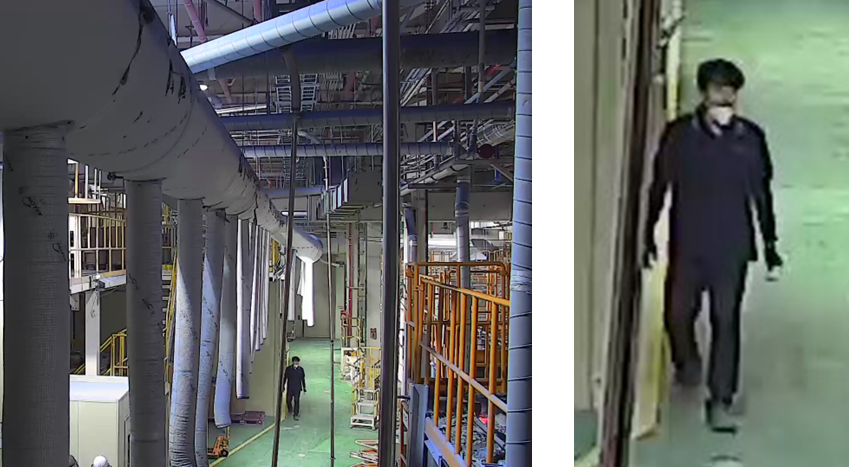
For an image like this, the agent generates intermediate outputs such as:
# Worn items
"worn_items" = ["mask", "gloves", "pants", "shoes"]
"evidence" = "The person is wearing a mask, gloves, pants, and shoes."

# Required body-part check
"target_region": "upper head and crown area",
"visible": true,
"evidence": "The top of the person's head and crown are clearly visible from the front."
PPE Mode then matches these outputs to the user scenario (for example, missing mask and helmet), and triggers an alert when the condition required item not detected + required body part visible is satisfied. In this example specifically, the person is detected with a mask but without a helmet, and the head region is visible, so a helmet-missing alert is generated.
As a result, across a 7-scenario PPE dataset, we observed the following performance gains:
| Mode | Accuracy | Precision | Recall | F1 Score |
|---|---|---|---|---|
| PPE Mode | 0.7850 | 0.8694 | 0.4010 | 0.5488 |
| Base Mode | 0.7116 | 0.6193 | 0.4079 | 0.4918 |
Numerically, PPE Mode shows a clear improvement in detection reliability over the base mode.
Operationally, the most meaningful change is the large increase in precision. That means a higher portion of "non-compliance" alerts correspond to actual violations, directly reducing unnecessary follow-up checks and alert fatigue.
4. Usability: Change Detection Targets Without Adding New Scenarios
PPE Mode generates detection scenarios in the following format, so users can switch required PPE targets without creating new scenarios each time.
## 💡 PPE mode is enabled for detection.
When a person is detected, the agent checks whether the person matches the configured work situation at the configured detection interval.
If any required item is not satisfied, an alert is triggered.

> ⚠️ For accurate PPE verification, configure detection targets to include the full body in the person box.

> Example: "person" or "worker"

> If there are 5 or more people, detection runs only for the top 5 largest boxes.

### Work Situation (only one can be specified)
Describe the work state or action of the target person.
- Seated and performing soldering work


### Required Items (up to 3)
Describe the PPE items that must be worn.
- Mask
- Helmet
Closing
The core of PPE Mode is the shift from "answer first" to "reason from evidence first." By doing so, we focus on reducing false positives in PPE non-compliance detection while improving alert quality that operators can trust in real environments.
As a next step, we will add more real field image cases and publish both quantitative and qualitative analyses on where improvements are most significant.
Footnotes
-
Wang et al., "Evaluating Object Hallucination in Large Vision-Language Models" (EMNLP 2023), https://arxiv.org/abs/2305.10355 ↩
-
Bai et al., "A Survey on Hallucination in Large Vision-Language Models" (2024), https://arxiv.org/abs/2402.00253 ↩
-
Anthropic, "Towards Understanding Sycophancy in Language Models" (2023), https://www.anthropic.com/research/towards-understanding-sycophancy-in-language-models ↩