EVA Release v3.0

EVA v3.0: Less Setup, More Deployment
This release is not just about adding new features. It focuses on making EVA easier to adopt, easier to configure, and more efficient to operate at scale.
Key Updates
- Detection Modes & Advanced Settings to reduce configuration complexity
- Scenario Templates for reusing validated detection scenarios
- Multi-Scenario Architecture supporting up to four scenarios per camera
- Bulk Camera Registration for large-scale deployments
Detection Modes & Advanced Settings: Easier Configuration, Smarter Detection
Achieving reliable detection results requires selecting the right detection strategy for each scenario.
Previously, users needed to understand and manually configure settings such as VM, VM + VLM, and Frame Mode. For first-time users, it was often difficult to determine which options were most appropriate for a given use case.
EVA v3.0 significantly simplifies this process.
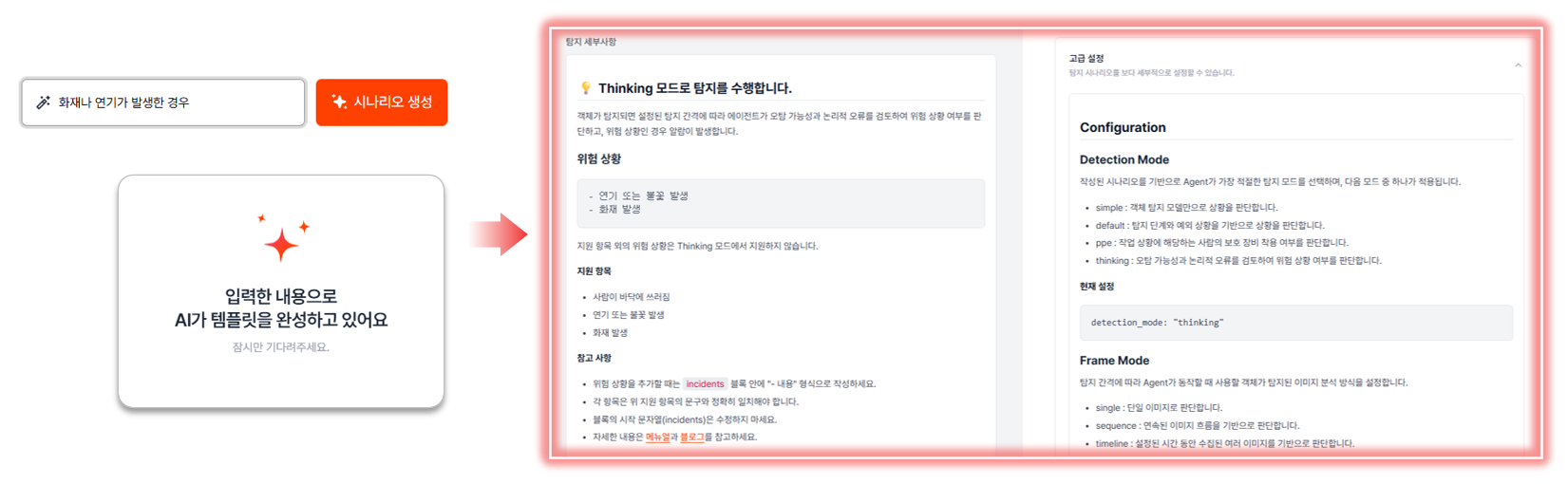
When a user describes a scenario, the EVA Agent analyzes the request, selects the most suitable detection mode, and automatically configures the required settings.
Depending on the characteristics of the scenario, EVA applies one of the following detection modes:
| Detection Mode | Description |
|---|---|
| Stepwise | Evaluates complex conditions based on detection steps and exception rules. |
| PPE | Optimized for detecting the presence or absence of personal protective equipment such as helmets, safety harnesses, and masks. |
| Thinking | Uses reasoning-based analysis to evaluate situations that are difficult to determine through object recognition alone, such as fires, falls, or hazardous incidents. |
| Simple | Suitable for straightforward object presence detection scenarios. |
For example, a scenario such as "Detect workers not wearing safety helmets" will automatically use PPE Mode, while a scenario such as "Detect fire or smoke incidents" will use Thinking Mode.
This allows users to benefit from the most appropriate detection strategy without needing in-depth knowledge of EVA's underlying detection architecture.
Advanced options have also been moved into a dedicated Advanced Configuration section.
General users can quickly deploy scenarios using EVA's recommended settings, while experienced users can access advanced controls whenever fine-tuning is required.
📷 Automatic Detection Mode Selection and Configuration by EVA Agent
For a deeper technical explanation of how detection modes work, please refer to the following technical articles:
What’s Improved
- New users can configure scenarios without understanding every advanced option.
- Detection modes are automatically selected based on scenario characteristics, reducing configuration effort.
- Advanced settings are separated into a dedicated section, making the primary workflow more intuitive.
- Experienced users can still fine-tune detection behavior when necessary.
Scenario Templates: Create Once, Reuse Across Multiple Cameras
One of EVA's greatest strengths is the flexibility to create detection scenarios using natural language.
However, when managing multiple cameras, users often find themselves creating the same or very similar scenarios repeatedly. Common use cases such as helmet violation detection, worker fall detection, and fire or smoke detection are frequently applied across multiple cameras.
Previously, users had to manually recreate or copy these scenarios for each camera.
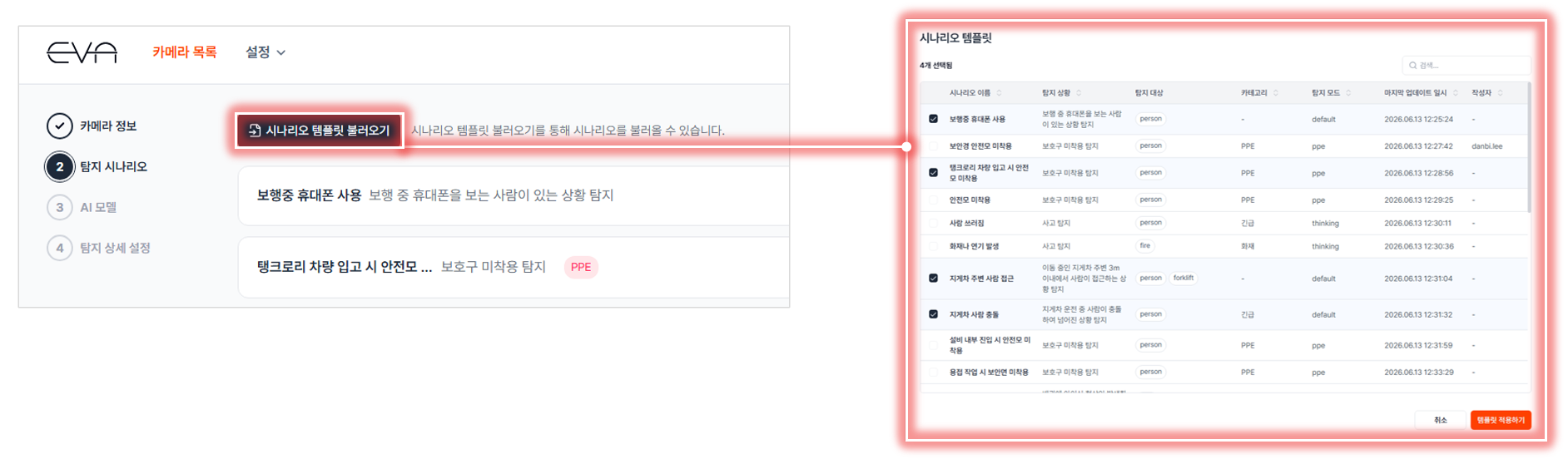
EVA v3.0 introduces Scenario Templates, allowing users to save and reuse validated scenarios across their deployment.
Once a scenario has been tested and verified in operation, it can be saved as a template and quickly applied to additional cameras without requiring manual reconfiguration.
📷 Selecting and Applying a Scenario Template
What’s Improved
- Reduce setup time by eliminating the need to recreate identical scenarios across multiple cameras.
- Maintain consistent configurations across cameras by reusing validated scenarios.
- Help new users deploy EVA more easily by leveraging existing templates.
- Minimize configuration errors caused by repetitive manual input.
Multi-Scenario Architecture: Independently Manage Multiple Situations on a Single Camera
In real-world environments, a single camera rarely monitors just one type of event.
For example, a production-line camera may need to monitor fire incidents, worker falls, restricted-area intrusions, and other safety-related situations simultaneously.
Previously, EVA handled multiple detection requirements within a single scenario. As detection requirements increased, scenarios became more complex and more difficult to maintain.
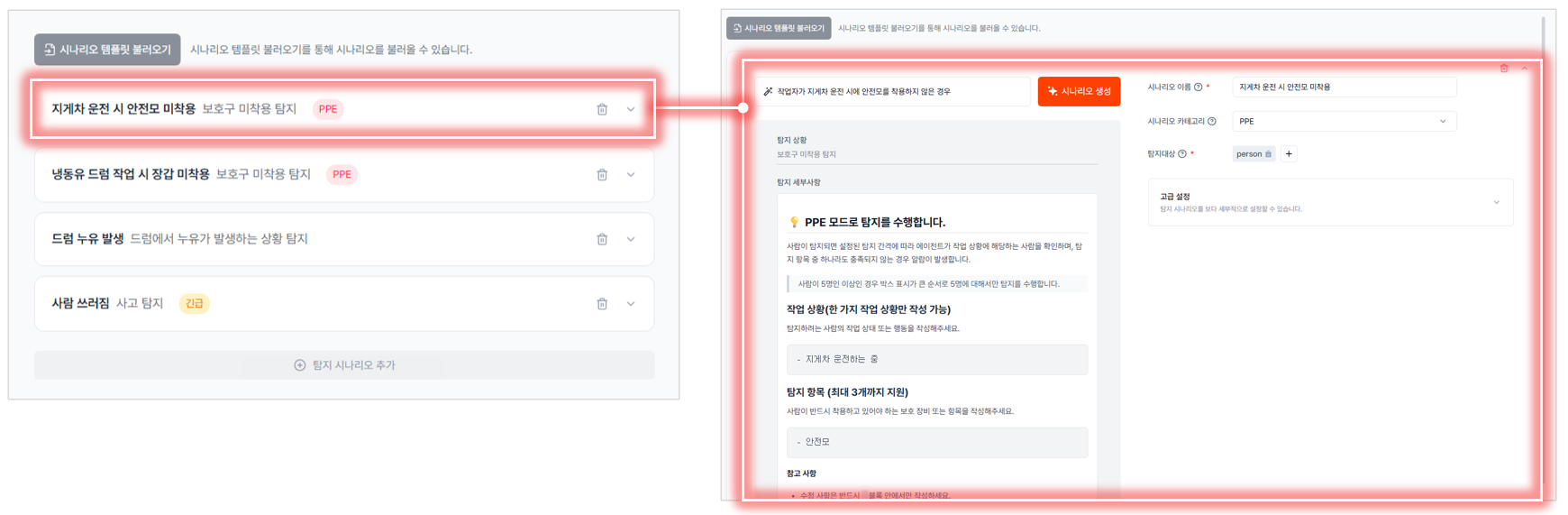
To address this limitation, EVA v3.0 introduces a Multi-Scenario Architecture, allowing up to four independent scenarios per camera.
Users can now create, manage, and configure multiple detection scenarios independently. Each scenario can have its own detection targets, settings, and operational lifecycle.
Specific scenarios can also be modified, disabled, or updated without affecting others.
📷 Multi-Scenario Creation and Management per Camera
Webhook integration has also been enhanced.
Previously, all detection events generated by a camera were delivered through the same notification channel. With EVA v3.0, users can configure notifications on a per-scenario basis, allowing external systems to receive only the events that matter.
What’s Improved
- Manage multiple detection objectives more effectively on a single camera.
- Update or maintain individual scenarios without impacting others.
- Improve operational visibility by separating complex requirements into dedicated scenarios.
- Increase integration efficiency by selectively forwarding only relevant detection events.
Bulk Camera Registration: Less Repetitive Work, Faster Deployment
Registering cameras is often one of the most time-consuming tasks when deploying EVA.
In environments with dozens or even hundreds of cameras, administrators must repeatedly register cameras, enter RTSP information, and apply detection scenarios.
As deployments grow, repetitive configuration increases the risk of input errors, missing settings, and inconsistent configurations. For large-scale projects spanning multiple production lines or sites, camera onboarding can become a significant deployment bottleneck.
EVA v3.0 introduces Bulk Camera Registration to streamline this process.
Administrators simply fill out the provided Excel template with the following information:
| Field | Description |
|---|---|
| Camera Name | Camera name |
| RTSP Source | Camera RTSP address |
| Scenario Template | Scenario template to apply |
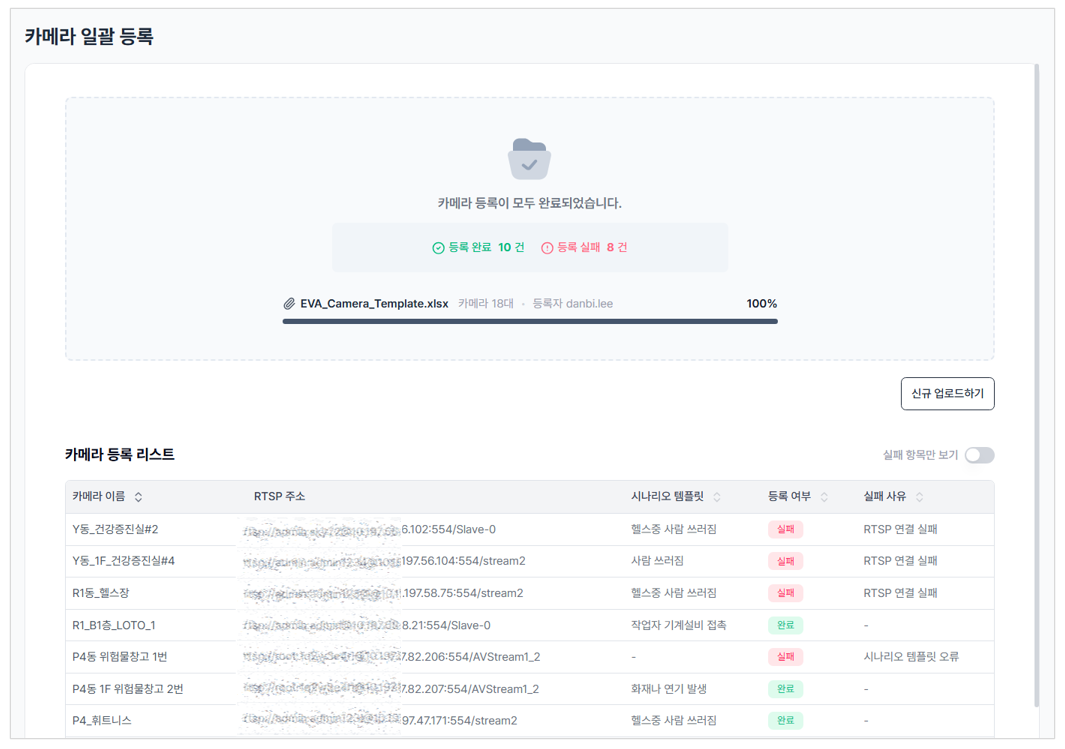
After uploading the completed Excel file, EVA automatically registers cameras and applies the specified scenario templates.
In addition, if registration fails, EVA provides detailed error information for each failed camera. Issues such as invalid RTSP addresses, missing required fields, or non-existent scenario templates can be identified immediately, allowing administrators to resolve problems quickly.
📷 Camera Registration Results and Failure Analysis
What’s Improved
- Register multiple cameras simultaneously to significantly reduce deployment time.
- Eliminate repetitive configuration tasks and reduce administrative effort.
- Apply standardized scenario templates across multiple cameras for greater consistency.
- Quickly identify failed registrations and their root causes to accelerate troubleshooting.
Closing Thoughts: Less Setup, More Deployment
The true value of AI-powered video analytics is not only in detection performance, but also in how easily and reliably it can be operated in real-world environments.
EVA v3.0 focuses on reducing repetitive tasks and improving operational efficiency through Scenario Templates, Multi-Scenario Architecture, Detection Mode Automation, and Bulk Camera Registration.
Configuration is now simpler, operations are more structured, and scaling across large deployments is easier than ever.
EVA will continue to evolve not only through advances in AI technology, but also by improving the day-to-day experience of the people who operate it.
🚀 Coming Soon: Preview of v3.1
- Camera Group Management
- Single Sign-On (SSO) Integration